Start with the learner’s decision and the information they need
A college open day, an evening skills course and an alumni newsletter have different audiences. Give each campaign a purpose and an owner. For a course launch, ask admissions which questions come up most often, then check the answers with the course leader before writing. Study hours, location, entry requirements and the next confirmed start date are often more useful than a long list of facilities.
Make the destination page the maintained source for fees, eligibility, accessibility arrangements and availability. Include the key details in the email as live text, with one clear link to the relevant course or event. If places fill or arrangements change after a send, update that page promptly. Use your admissions or event system for applications, attendance records and confirmations.
Adult learners and course enquirers
Invite people to select subjects and study patterns they want to hear about. An adult learner considering part-time study may need evening hours and location details. A course enquiry needs a helpful reply, while future promotional newsletters need an appropriate marketing signup.
Parents, alumni and staff
Keep these audiences distinct. A parent newsletter might explain an information evening, while alumni may prefer an invitation to a public lecture or a graduate story. Staff operational updates belong in a separate communication plan so promotional preferences cannot interrupt essential notices.
Use a small set of purposeful categories, such as subject interest, preferred campus and adult evening study. Record what the person chose and review whether you still need it. Avoid importing safeguarding notes, disability information, learning-support details or full student records into a marketing list.
Six email campaigns for education and training providers
01 · Open dayHelp people decide whether to visit
Introduce the event with its confirmed date, campus and format. Show who they can meet and the subjects covered, then link to the current event page. Give people enough notice to arrange travel or time away from work. Check capacity with the event owner before sending.
Subject idea: “Explore our evening courses at next month’s open evening”. Main link: See the open evening programme.
Include a short list of questions visitors could ask about teaching hours, facilities and study expectations. UCAS’s open-day preparation advice can help higher education teams understand the decisions visitors bring with them.
02 · Course launchExplain how a course fits into a working week
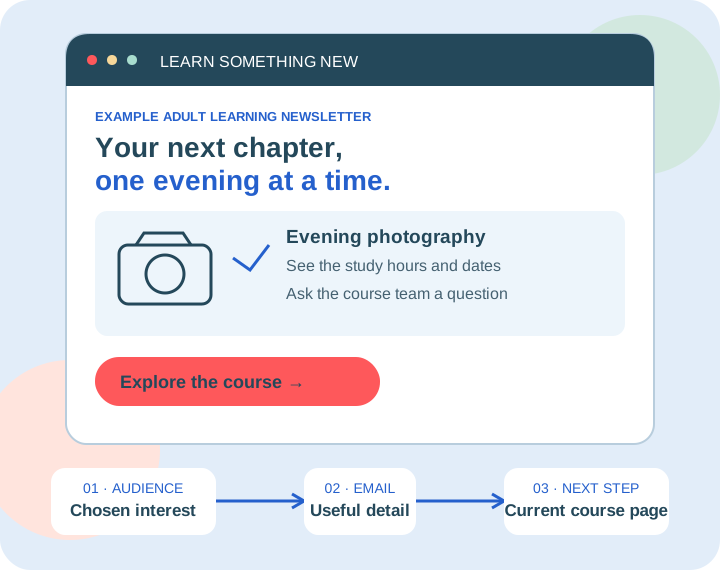
Send a focused announcement to subscribers who selected that subject. State the teaching format, planned weekly commitment, venue and start date using approved information. Link to the detailed course page for current fees and entry requirements. Avoid suggesting that everyone is eligible for funding.
Subject idea: “New evening photography course: see the dates and study hours”. Main link: Explore the course.
03 · Tutor introductionAnswer one question before someone applies
Ask a tutor to explain a common concern, such as what a beginner should bring to the first practical session. Use a short answer, an approved photograph and a link to a course FAQ. Keep teaching claims specific to that course and obtain permission for any contributor’s words or image.
Subject idea: “Do I need experience before joining our beginner course?” Main link: Read the tutor’s course FAQ.
04 · Course information sessionGive interested subscribers a way to ask questions
Invite the relevant audience to a confirmed online or campus session. Explain who will attend, what will be covered and how to join. Use your existing registration system. Send practical joining instructions through the appropriate event communication process, separately from future course promotions.
Subject idea: “Ask our course team about part-time study”. Main link: View session details.
05 · Alumni storyShow what a learning experience involved
With the graduate’s permission, share a first-person account of a project, how they managed study time or what they enjoyed learning. Clearly attribute their experience and avoid presenting one story as a typical earnings or employment outcome. Invite opted-in alumni to contribute their own story or attend a relevant event.
Subject idea: “How one evening learner planned their first exhibition”. Main link: Read the learner’s story.
06 · Next termOffer a relevant next learning opportunity
For subscribers who asked for related-course news, introduce a next-level course or a different subject that complements their interest. Explain the entry requirements and let them choose. Confirm the next intake is actually open and avoid implying that completing one course guarantees a place on another.
Subject idea: “Planning your next term? Explore the next photography level”. Main link: Compare course options.
A four-week plan for an adult evening course launch
Imagine a local training provider preparing an evening photography course. Its example list contains 800 eligible subscribers who chose adult-course news, including 220 who selected photography. These are illustrative planning numbers. The team uses its existing course pages and registration system, and manually checks audience eligibility before each send.
Week 1 · PrepareMake the course page answer the essentials
Confirm dates, teaching hours, equipment, entry requirements and current fees with the course owner. Check the enquiry route works on a phone. Review subscriber preferences and record recent comparable enquiries as a baseline.
Marketing sends: 0
Week 2 · IntroduceAnnounce the new evening programme
Send a concise programme introduction to the 800 eligible adult-course subscribers. Use a clear photography course link alongside the wider programme page, and record clicks to each destination separately.
Illustrative sends: 800
Week 3 · ExplainAnswer a practical photography question
Send the tutor’s equipment FAQ to the 220 eligible photography subscribers. Recheck enrolment availability, unsubscribes and preferences first. Link to the current course page and existing enquiry form.
Illustrative sends: 220
Week 4 · ReviewReview enquiries with the course team
Compare course-link clicks with enquiries and applications in your separate records. Note other advertising, timetable changes and open-day activity. Use recurring questions to improve the course page before deciding on another campaign.
Marketing sends: 0
Budget for 1,020 example sends. The 220-person subject group receives both relevant messages, so those sends count twice. Add other departments’ planned campaigns before choosing an allowance. An enrolment peak can require a different monthly package from the quieter teaching period.
A UK company to support your recruitment calendar
Open days and new intakes concentrate activity into a few weeks. Choose tools, support and sending costs that your team can plan around throughout the academic year.
UK mailing-data storage
Customer mailing data is stored in the UK on our own infrastructure. Read our UK network information when assessing the supplier. Review wider processing and any admissions or learning systems separately.
Friendly UK support you can reach easily
Our UK team can help with a question before an open-day announcement or course launch. Reach real people by phone, email or live chat. We do not use chatbots.
An established UK company
Email Blaster has been developing its software in the UK since 2009. Read our company story and get to know the people behind the service your marketing team will use.
Clear, transparent send-based pricing
Plan costs from the number of recipients across your newsletters and recruitment campaigns. Check current allowances, VAT and terms on our pricing page, with monthly and pay as you go options.
Move your monthly package up or down
Adjust your monthly package as month-by-month sending volume changes. A month of open-day invitations may need a higher allowance than a quieter month between intakes. Check the current terms when planning changes.
Keep marketing choices separate from essential learner messages
Build course-news audiences through clear, voluntary newsletter signups and keep a record of what people chose. An application, attendance record or parent contact address does not by itself demonstrate a newsletter signup. Make unsubscribing straightforward and carry that choice across relevant marketing lists. Email Blaster does not permit purchased lists or cold campaigns.
Keep safeguarding, assessment results, support needs and essential operational notices within your organisation’s approved systems and processes. Do not assume the marketing platform is suitable for sensitive learner records or emergency communication. For children and young people, involve your organisation’s data-protection and safeguarding leads before designing any marketing signup or audience.
Review GOV.UK’s direct marketing guidance and our email marketing permission guide. Before every send, ask the course owner to verify dates, fees, availability and links. If the course changes, update the maintained course page promptly.