Search for your subject
Start with a clear keyword related to your campaign. Try a different phrase when you want a new angle or a more specific visual.
Find the visual that brings your message to life. Browse royalty-free imagery, keep your own files organised and make the finishing touches in File Cloud, without leaving Email Blaster.

From an inviting newsletter header to a striking product announcement, the right image helps tell your story. Search the free image library for photography and graphics that suit your topic, then bring your choice into your campaign.
The library is available inside our UK email marketing software, so finding imagery stays part of your design workflow. Preview your options before adding them to your collection, then use the drag and drop email designer to put them into place.
Start with a clear keyword related to your campaign. Try a different phrase when you want a new angle or a more specific visual.
Preview an image and review its details. Think about the space it will occupy and how it supports the message you want readers to take away.
Add your choice to your collection and use it in your email. Give important images room to stand out and balance them with clear, readable copy.
Upload your own images and files with drag and drop, then organise them into folders. Keep logos, product photography and campaign graphics close at hand for the next time you need them.
File Cloud works in a familiar way: create folders and move files into them by dragging and dropping. Group assets by campaign, season or brand so your collection remains easy to navigate as it grows.

Use search to locate an image in your collection. Change the sorting between newest and oldest, or switch to a filename view when that makes it easier to find what you need.
Clear filenames and a few well-chosen folders help your team spend less time searching and more time putting the campaign together.
Keep your logo and regular campaign assets together, ready to reuse. A familiar set of visuals helps your emails feel connected even when the topic changes.
Pair your images with personalised content to make the message relevant to the people receiving it.
Found an image that is nearly right? Open the built-in editor to crop and resize it, adjust brightness and colours, or apply a filter. Shape the visual to suit your design while staying in the same workflow.
Add text directly to an image for a headline, tagline or promotional message. Keep essential information in the email’s text too, so readers can still understand the message when images are unavailable.

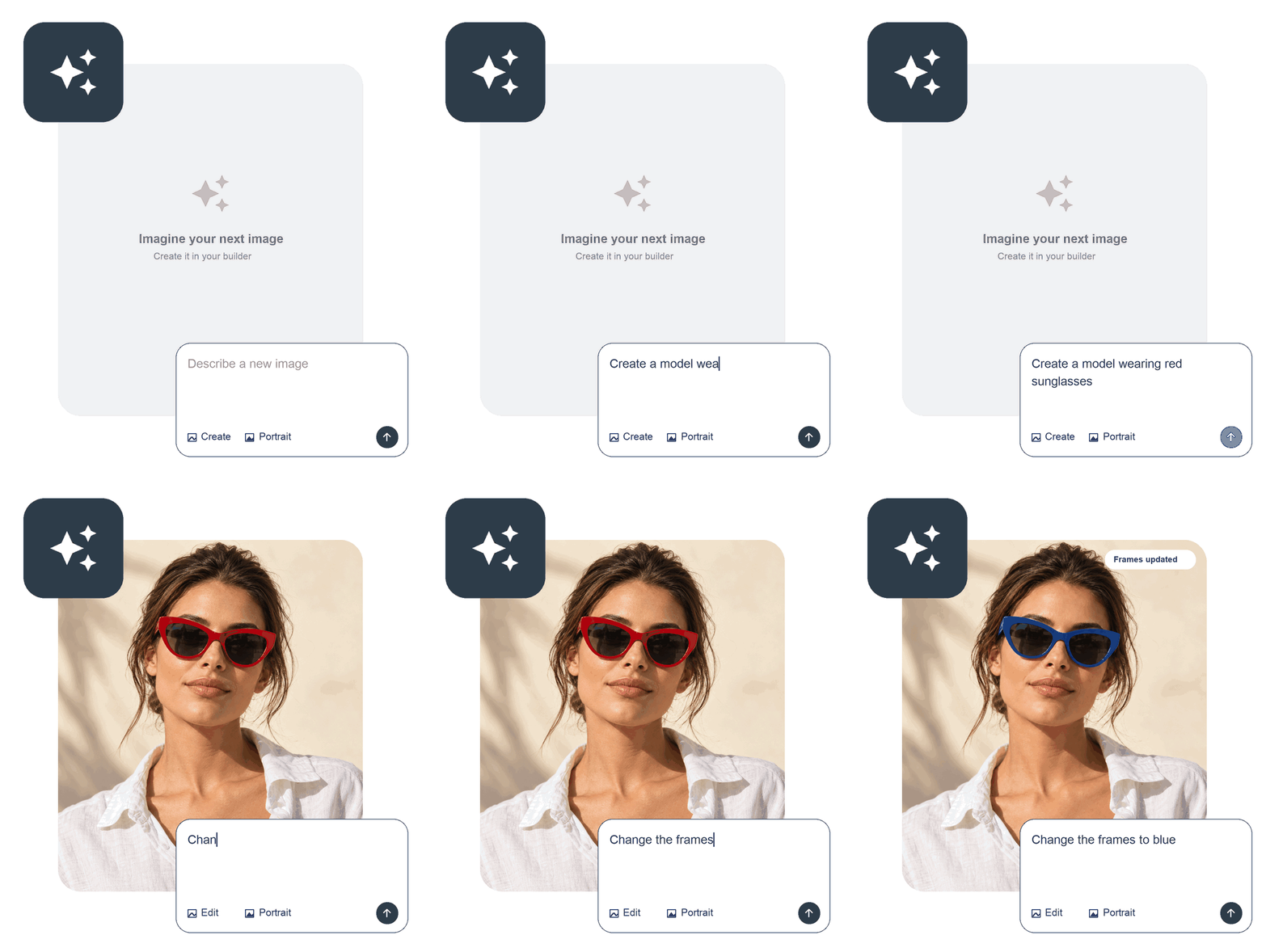
Have an image in mind? Describe it in plain English and let AI bring it to life inside the email designer. Create a visual to suit your campaign, from a newsletter header to an image for your latest promotion, without switching tools.
Tell the AI what you would like to see, including the subject, colours and style. Choose a portrait or landscape format to suit your layout, then generate your image. Review the result and use it in your email, or refine your description to try a different direction.
Use your File Cloud collection in the email designer, or start a fresh campaign with the AI email builder. Choose imagery that helps explain your offer, then make the next action easy to see.
Once your campaign is sent, explore clicks and popular links in the analytics suite. Use A/B testing to compare a considered change to your content or main image.
Explore the free image library, organise your own assets and create a campaign that feels like your business.