Plan around your service, capacity and audience
Ask your front-of-house team which services could accommodate extra guests. A neighbourhood café might want more midweek lunch visits, while a restaurant with full weekend sittings may want to promote its early weekday menu. Agree the days, available capacity and a cutoff for stopping promotion before drafting the email.
Put the answer to “Can I go?” near the top. Give the branch, date, service hours and any booking requirement in readable text. If guests often ask about parking or access, link to the venue information that answers those questions. Check the menu and booking pages on a phone before scheduling.
Offer a useful reason to subscribe
A QR code on the counter or a link on the menu page can invite guests to receive occasional seasonal menus and event news. Describe how often they can expect to hear from you and collect only the details needed for that newsletter.
Send to the people it suits
For several branches, invite subscribers to choose their preferred venue. Start with that preference and keep a shared calendar so a guest who follows two locations doesn’t receive overlapping announcements by accident.
Six email campaigns for restaurants and cafés
01 · Seasonal menuLet subscribers see the new menu first
Show one dish and tell the short story behind it. Give the first service date, menu availability and a link to the current menu. Check the kitchen can supply the featured dish throughout the promoted period.
Subject idea: “Our autumn lunch menu starts on Tuesday”. Main link: View the lunch menu.
02 · Quiet serviceGive midweek lunch a purpose
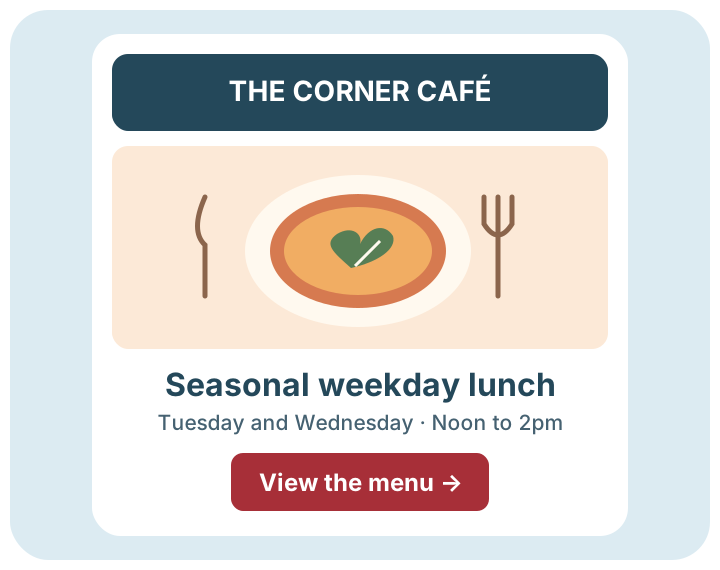
Pick a service with room for more guests. A café near offices could show a short weekday menu, its service hours and whether tables can be booked. Give people enough notice to arrange lunch with colleagues. Check actual bookings or covers with the venue team.
Subject idea: “Make a plan for Wednesday lunch”. Main link: See weekday lunch details.
03 · Local eventMake it easy to plan a visit around an event
For subscribers near the venue, share a confirmed market or theatre date and the service you’re offering around it. Explain when the kitchen closes and how to find you. Link to your existing booking page if you accept reservations.
Subject idea: “Coming to the Saturday market? Here are our opening hours”. Main link: Plan your visit.
04 · Ticketed eveningInvite guests to a limited-capacity tasting
Give the menu theme, date, price, capacity and booking terms using confirmed details. Check availability just before sending and keep it up to date on your existing event page. If the event sells out, let that page explain what guests can do next.
Subject idea: “An evening with our local coffee roaster”. Main link: View event details.
05 · Subscriber welcomeHelp a new subscriber choose their first visit
Send a short introduction to your opted-in audience. Explain what the newsletter covers and give a useful first link, such as a brunch menu with service hours. For multiple venues, give people a way to find the right location.
Subject idea: “Welcome to our café newsletter”. Main link: Explore our café and menu.
06 · Behind the menuGive regulars something new to look for
Tell a short story about a supplier or a dish your team is developing. Get permission to use any contributor’s photo or quote. End with a practical detail, such as which day the bakery counter carries the new loaf.
Subject idea: “Meet the baker behind Friday’s sourdough”. Main link: See what’s on the counter.
A four-week plan for a neighbourhood café
Imagine a café launching a seasonal weekday lunch menu. The manager wants to make better use of Tuesday and Wednesday tables. The café uses its own menu page, an optional newsletter form and till records. The figures below illustrate planning for a list of 600 people, with 240 interested in this venue’s weekday menu.
Week 1 · PrepareAgree the service details
Confirm the service hours, dishes and booking or walk-in policy. Update the menu page, check the newsletter signup and record recent comparable weekday covers. Send a test to the kitchen and front-of-house leads.
Newsletter sends: 0
Week 2 · LaunchAnnounce the menu
Send the launch to 600 eligible subscribers whose signup covers venue news. Use a dish photograph with permission and one link to the menu. Note the campaign date and inspect the menu link clicks.
Illustrative sends: 600
Week 3 · Follow upFeature a quieter service
Check capacity before scheduling. Send a follow-up to 240 eligible people who chose weekday menu news. Feature a different dish and restate the Tuesday and Wednesday service times.
Illustrative sends: 240
Week 4 · ReviewDecide what to repeat
Compare weekday covers with similar services. Note differences in opening hours, weather, local events and menu availability. If there is no useful new reason to send, spend the week improving the menu page or next campaign.
Newsletter sends: 0
Plan for 840 example sends. Count each campaign’s eligible recipients, then add any other newsletters planned for that month. Review the allowance before a busy period with several venue launches or events.
UK support and costs you can plan around
From a quiet January to a month with several venue events, your mailing needs can change faster than your regular service schedule.
UK mailing-data storage
Customer mailing data is stored in the UK. See our UK network information and review the terms for wider processing and any booking or ordering tools you use separately.
Friendly UK support you can reach easily
Speak to the UK support team if you need help before a menu launch or want to check how to set up a campaign for a second venue.
An established UK company
Email Blaster was founded in 2009 and develops and supports its software in the UK. Read our company story to learn about the team behind the software.
Clear, transparent send-based pricing
Estimate sends across your planned menus, events and venue newsletters. Compare the allowances and current VAT details on the pricing page.
Adjust your monthly package as plans change
Move your monthly package up or down as your month-by-month sending volume changes. A month of event invitations might need a higher allowance than a month with one menu update. Check the current terms when planning the change.
Keep reservations and newsletter permission separate
Ask guests directly whether they want marketing emails. A reservation address is there to manage the reservation. Keep records of marketing signups, make unsubscribing easy and respect the choice across venue lists. Email Blaster does not permit purchased lists or cold campaigns.
Keep booking notes, allergy information and other sensitive details in the appropriate venue systems. For a newsletter, a selected venue or menu preference is usually enough. Check GOV.UK’s direct marketing guidance and our permission guide when planning signup wording.
Before every send, ask a colleague to confirm the venue, dates, service hours and live link. Update the destination page if a dish changes or a service sells out after sending.