
Hello gang.
The new EB secure login system has now gone live. To help further protect your account and data inside it we have made live our new and improved login system
When using your Email Blaster Email Marketing account, last month we introduced our 256 bit encryption. To improve security even further we have now introduced a two stage login system.
When accessing your Email Blaster account, you will first be asked to enter your username and password – after confirming these details you will be redirected to the second part of the authentication system.
The second part of our new authentication system will request that you enter an image verification code shown on screen. Our new image verification system is powered by the reCAPCHA system.
reCAPCHA is considered one of the most secure image verification systems available. The system also used by well known brands such as Facebook.
Not image verification!
We have all used image verification systems before. Some of them are notoriously difficult to use, showing verification codes that are almost impossible to read and use.
During development we tested several different implementations and considered the reCAPCHA solution very user friendly and easy to use. We hope that you find the new login system simple to use, while at the same time increasing security to your account.
What does it look like and how do i use it?
When you next login to your Email Blaster email marketing uk account you will notice that the following box will appear:
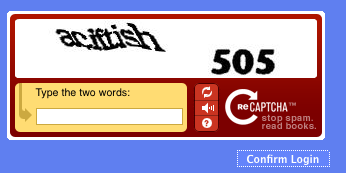
Simply enter the code shown inside the image and you are ready to roll!